

In today’s fast-paced business world, making good presentations takes a lot of time and effort.

Teams are always busy, needing to create slides quickly that look great and are full of correct information. It’s a tough balancing act: be fast, be good, and don’t make mistakes. This is where AI for presentations comes in, changing how we get work done.
Using AI can help make presentations faster and better. But it’s not just about speed. It’s also about making sure the information is right and keeping secrets safe. For example, in 2026, many experts advise businesses to be careful not to put private company details into public AI tools, to protect important information and avoid problems with intellectual property or privacy rules AI at work: what employers must require.
This guide will help you understand how to use AI for presentations in smart ways. We will look at what AI tools can do for you, how to start using them in your own AI projects, and what rules you need to follow. We will also talk about how to know if these new tools are helping your business grow and get a good return on your investment (ROI). By reading this, you can become an AI driven leader in your company, helping your enterprise AI efforts succeed and making your work much easier. For more ideas on how to use AI wisely, consider reading a strategic playbook for business leaders in 2026.
For even more daily insights into how AI is shaping the business world, you can get The AI Newsletter Worth Reading.
How AI for presentations boosts productivity
Using **AI for presentations** isn’t just a small helper; it’s a big change for how teams get things done. In 2026, many businesses are finding that AI tools can handle the boring, time-consuming parts of making slides. This lets their smart people focus on more important tasks.
Here’s how AI helps make work much faster:
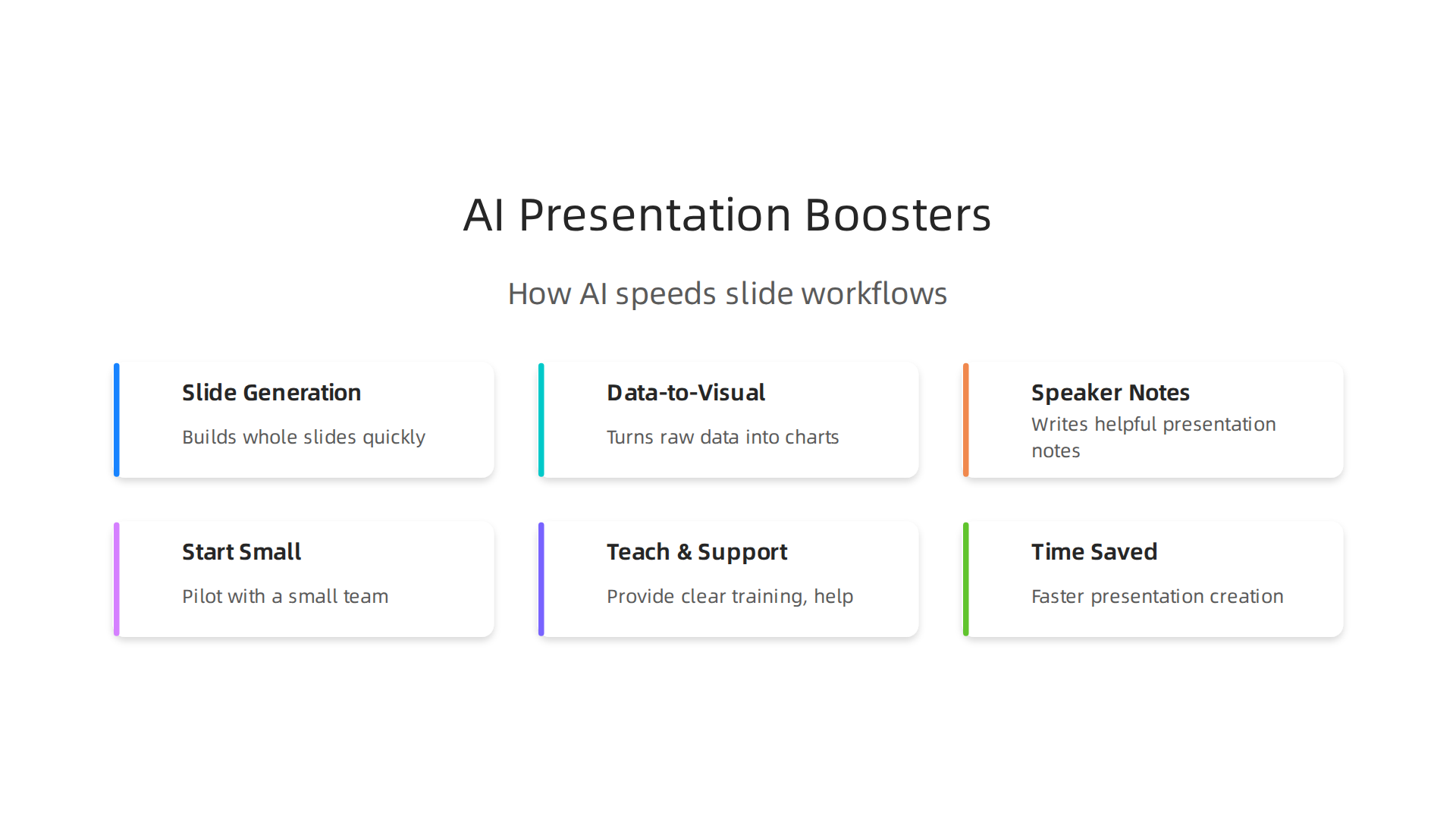
- Slide Generation: Imagine needing a new presentation quickly. AI can take your ideas or a simple outline and build whole slides for you. It can choose good designs, set up layouts, and even suggest text for each slide. This saves hours that someone would normally spend starting from scratch.
- Data-to-Visual Transformations: Often, presentations need to show numbers and facts in a clear way. AI can look at your raw data and automatically turn it into easy-to-understand charts, graphs, and pictures. You don’t have to manually create these visuals anymore, which means fewer mistakes and a faster finish.
- Speaker Notes: Preparing notes for a presentation can take a lot of time. AI can listen to your presentation content or read your slides and then write helpful speaker notes for each one. This makes sure you’re ready to speak with confidence and all the right details.
By letting AI do these jobs, companies see a real boost in how much work they can do. Studies in 2026 show that companies using AI report big jumps in worker productivity. For example, many firms using AI say it helps workers get more done, improves how decisions are made, and even sparks new ideas Adoption of Artificial Intelligence Among Firms Soon Da Ren. Some reports even show that using AI for certain tasks can make people 15% to over 50% faster, while also making the quality better AI, Productivity, and Labor Markets: A Review of the ….
This kind of automation means that senior staff, like managers and leaders, don’t have to spend their valuable time on formatting or basic slide creation. Instead, they can focus on bigger picture things. They can think about strategy, come up with new business ideas, and make sure the presentation tells the right story for the company. This shift helps to spark business growth and makes the whole process from first idea to final presentation much quicker. It truly helps an AI driven leader move their enterprise AI forward.
If you are looking for tools that can help your business, understanding what is out there is key. Find out more about how to choose the right programs with a guide to Top AI Tools 2026 Strategic Guide For Business And Policy Leaders.
Choosing the right AI tools for presentations
Once you see how much **AI for presentations** can help you work faster, the next step is picking the best tools. In 2026, there are many different AI helpers out there. Choosing the right ones is very important for any business leader. It helps make sure your **enterprise AI** projects truly make a difference.
When looking at tools, think about these main things:
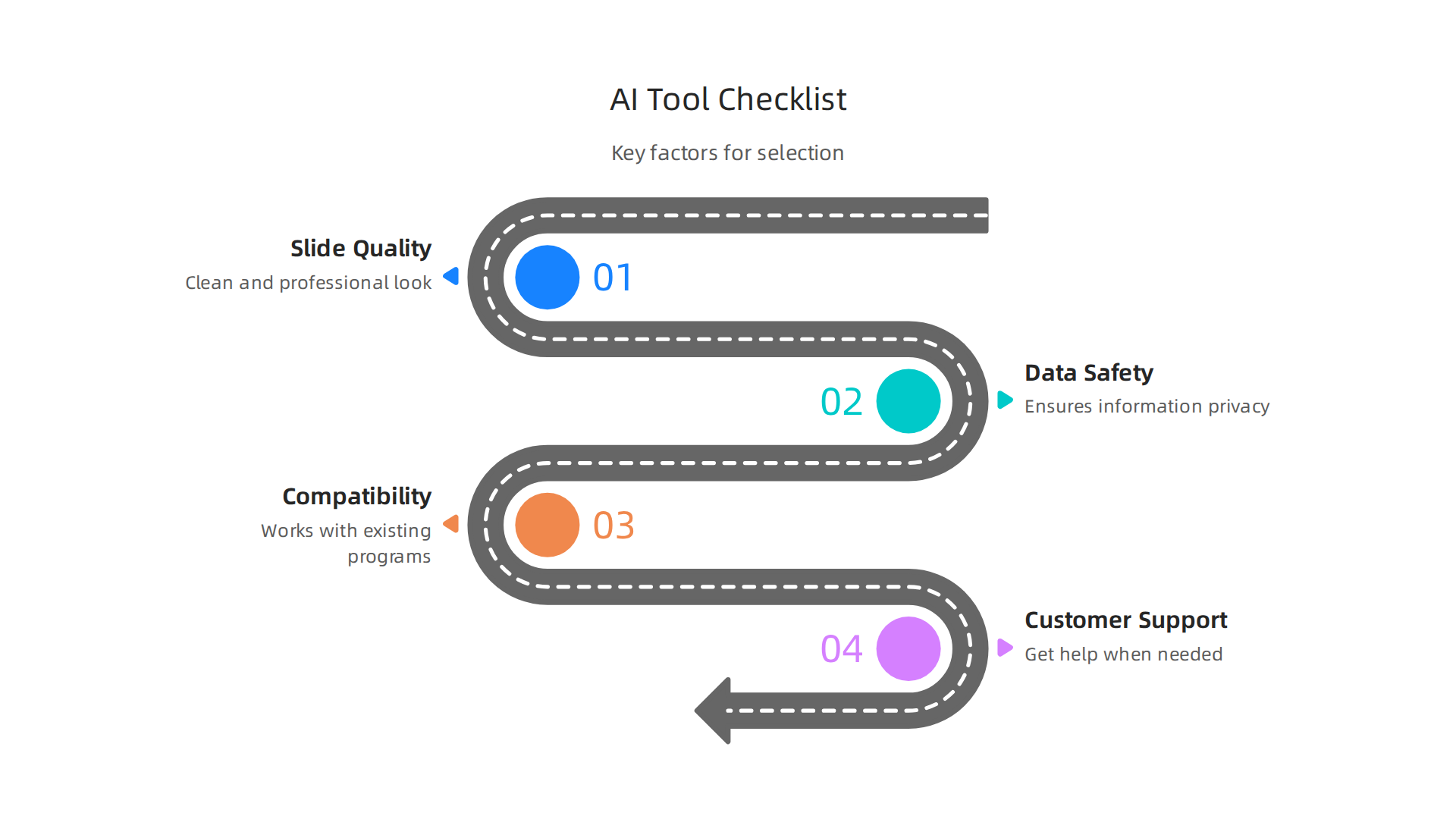
- How good are the slides? You want the AI to create slides that look clean and professional. Does it use your company’s colors and fonts correctly? Some tools are very good at keeping your brand’s look, which is key for business presentations Best AI Slide Generators for the Second Half of 2026: Top 5 Compared. Others like Beautiful.ai are known for making slides that always match your brand’s style Best AI Presentation Maker 2026: Gamma, Canva & Beautiful.ai.
- Is your data safe and private? This is super important, especially for companies. You need to know that your important information won’t be shared wrongly. Make sure the AI tool has strong ways to protect your data. Some tools are built with "enterprise-friendly security," meaning they are designed for big companies that care a lot about safety 8 Best AI Slide Generators Worth Using in 2026. Always check if an IT expert can approve the tool’s security features Best AI Slide Generators 2026: Can Your Team Edit the Same Deck …. Learning how to make sure your AI systems are secure and follow rules is a big part of any ai driven leader role. You can find out more about how to do this securely with a guide on how to build AI securely and compliantly.
- Does it work with other tools? Your business probably uses programs like PowerPoint or Google Slides. The best AI for presentations tools will connect easily with what you already use. They should also be able to pull information from your data sources if needed. How well a tool fits into your daily work is called "compatibility" Best Ai Chatbots For….
- Can you get help when you need it? Good customer support from the company that made the AI tool is very helpful. If something goes wrong or you have questions, you want to be able to get answers fast.
There are two main kinds of AI presentation tools. Some are "turnkey," meaning they are ready to use right away to make slides. They are often quick and easy for simple presentations. Other tools are more like a "toolchain" because they can connect to many different data sources. These are better for more complex ai projects where you need to show lots of numbers and facts in new ways.
Choosing the right mix of tools helps you become a true ai driven leader. It lets you make better presentations faster, which can help your company spark business growth. Taking the time to pick wisely can save you a lot of effort later.
Stay updated on how AI is changing the business world and policy by subscribing to The AI Newsletter Worth Reading. This newsletter gives you clear daily updates on important AI topics.
Integrating AI into workflow and collaboration
Now that you’ve picked the right AI tools, the next big step is fitting them into your daily work. Taking the time to pick wisely can save you a lot of effort later, and truly integrating these tools means making sure your whole team can use **AI for presentations** easily. It’s not enough to just buy a tool; you need to make it a natural part of how everyone creates slides. This is especially true for **enterprise AI** projects, where many people need to work together.
How AI Tools Join Your Workflow
Think of how different AI tools can work together like puzzle pieces. There are a few common ways to make sure they fit well into your company’s daily tasks:
- APIs (Application Programming Interfaces): This is like giving tools a secret handshake so they can talk to each other. For example, your AI presentation tool might use an API to pull up-to-date sales figures from another company system. This helps create slides with the very latest information automatically.
- Cloud Services: Many AI tools live online, in the "cloud." This means you can get to them from anywhere, and your team can work on presentations together no matter where they are. Cloud-based tools make sharing and editing very easy.
- Plugin-Based Workflows: Some AI tools add on directly to programs you already use, like Microsoft PowerPoint or Google Slides. These "plugins" let you use AI features right inside your familiar presentation software. It feels like an extra helpful button right there when you need it.
No matter how you connect your tools, it’s vital to have "governance checks." This simply means having rules and ways to make sure the AI is always creating good, correct, and safe content. This is a key part of managing any ai projects.
Helping Your Team Use AI Tools
Getting your team to use new AI tools smoothly is super important. This is called “change management.” Even the best **AI for presentations** won’t help if people don’t know how to use it or don’t want to. Here’s how an **ai driven leader** can make it work:
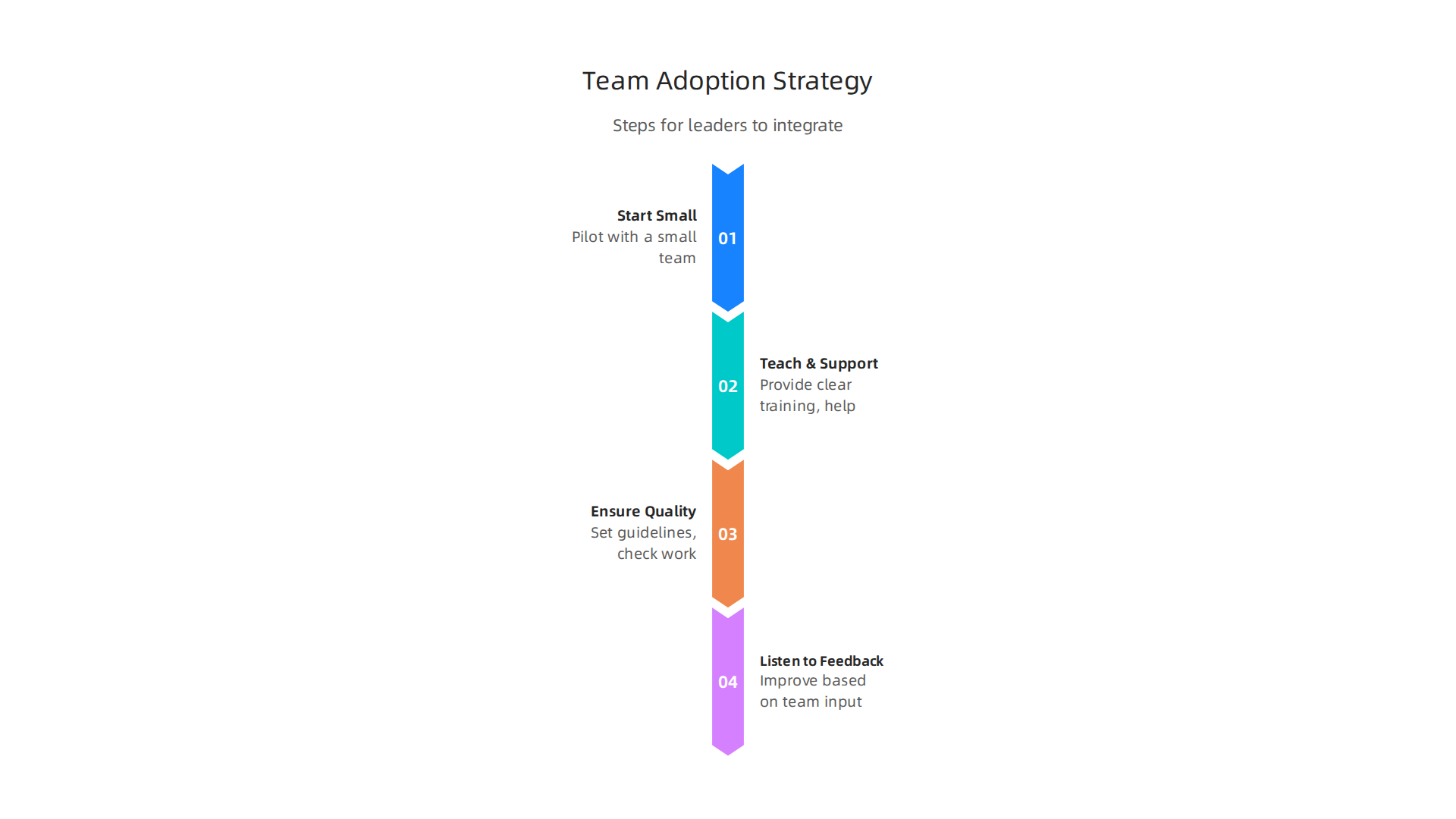
- Start Small: Don’t try to change everything at once. Pick a small team or a few specific presentations to start using AI. This helps you learn what works best and fix any issues before rolling it out widely. Starting with a focused, high-value use case is a proven strategy for successful enterprise AI adoption, according to AI Implementation Case Studies 2026: Successful Enterprise Results.
- Teach and Support: Provide clear training. Show your team how the AI tools save them time and make their work better. Offer help when they get stuck. Think about creating toolkits or checklists to guide them, as suggested in the AI Change Management Strategies: Complete 2026 Guide. This helps you Build Your AI Advantage as a business leader.
- Keep Quality Consistent: Set clear guidelines for what a good AI-generated presentation looks like. Check the work to make sure it meets your company’s standards, especially for important things like accessibility. For example, all images should have good descriptions (alt text), and colors should have enough contrast so everyone can read them easily. This makes for AI Presentation Accessibility: Creating Inclusive Slides Automatically. Making sure your presentations are accessible helps everyone, no matter their abilities, and is a key part of How to Make Presentations Accessible to All.
- Listen to Feedback: Ask your team what’s working and what’s not. Use their ideas to make the AI tools even better. This helps everyone feel involved and invested in the change.
By carefully bringing AI tools into your workflow and helping your team adapt, you can truly spark business growth. It ensures that your investment in AI for presentations pays off, making your company more efficient and innovative.
Measuring ROI and business impact
After you’ve successfully brought AI tools into your daily work, the next big question is: are they truly helping your business? It’s not enough to just use **AI for presentations**; you need to see real results and know your investment is paying off. This is especially key for any **enterprise AI** project, where smart leaders want to ensure their new tools make a big difference.
Key Ways to Measure Success with AI
To truly understand how AI is helping, you need to look at a few important numbers and feelings. These are called Key Performance Indicators, or KPIs. Here are some simple ways to measure the impact of your AI tools:
- Time Saved: How much faster can your team now make presentations? If an AI tool cuts down the hours spent on slides, that’s a clear win. For example, reports show that using generative AI can make people 33% more productive in the time they use it, leading to big gains in tasks like writing and customer support
AI in the Real & Deal Economy / FEB 2026 / page 2. - Deal Velocity: For sales teams, faster, better presentations can help close deals quicker. If your AI-assisted pitches move through the sales process faster, that shows a direct business benefit.
- Content Reuse Rate: Are your AI tools helping you get more mileage out of your existing content? If AI can easily pull bits and pieces from old presentations to make new ones, it saves time and keeps your messages consistent.
- Error Reductions: AI can help catch mistakes or make sure information is accurate. Fewer errors mean a better quality product and less time spent fixing things.
- User Satisfaction: Simply put, do your employees like using the AI tools? If they find the tools easy and helpful, they’ll use them more, leading to better results. Happy users mean a smoother transition for your ai projects.
How to Check AI’s Impact
To be sure that your AI tools are truly behind these good changes, you need to set up simple tests. An **ai driven leader** understands that just seeing good results isn’t enough; you need to know *why* they’re happening.
- Start with a Baseline: Before you fully use the AI, measure how things are done now. How long does it take to make a presentation? How many errors are usually found?
- Run Small Tests: Let a small group of your team use the AI tool for specific tasks. Compare their results to a group not using AI. This helps you see the real difference the AI makes. For example, some companies found that AI boosted their overall labor productivity by 4% in 2026
Economy – hai.stanford.edu. - Collect Feedback: Ask your team directly if the AI is helping them. Their day-to-day experience is super valuable.
- Watch the Numbers: Keep an eye on the KPIs we talked about. Are they moving in the right direction? Are you truly seeing a spark business improvement?
- Adjust as Needed: If the numbers aren’t what you hoped for, don’t worry. This is a chance to make changes to how you use the AI or even to the AI tool itself. Measuring also means knowing when to change course.
By carefully tracking these numbers and listening to your team, you can show the clear value of your AI for presentations and ensure your enterprise AI efforts are truly making a positive impact. These insights are also crucial for those aiming to understand how to drive decisions with AI, ensuring ethical and strong performance. Learn more about this by reading our guide on Driving Policy Decisions with AI Ethics and Performance Evaluation.
Staying on top of these trends and getting clear, daily AI updates is crucial for any professional.
The AI Newsletter Worth Reading
Making sure your AI tools are giving good results is just one piece of the puzzle. Now, let’s talk about making sure those AI-made things actually look and sound like your brand.

This means keeping control over quality, tone, and design. When you use AI for presentations, you want them to be helpful and also clearly yours. This is super important for any enterprise AI tool, where your company’s look and message need to be just right.
Keeping Your Brand’s Voice and Look with AI
AI tools are great at making things fast, but sometimes they can forget your unique brand style. Imagine your brand has a special way of talking or certain colors and fonts it always uses. AI needs to learn these rules to truly help.
Here’s how to keep control:
- Use Brand Templates: Many AI presentation makers let you put in your own templates. This means AI will use your company’s colors, fonts, and slide layouts. Tools like Beautiful.ai are known for helping businesses keep their brand look constant across many presentations. Other AI slide generators also focus on making sure your brand guidelines are followed 2026 Best AI Presentation Makers in 2026 (Compared) – Havi AI, by letting you apply brand templates Best AI Slide Generators for the Second Half of 2026: Top 5 Compared.
- Teach the AI: You can train some AI tools on your past presentations or brand guides. This helps the AI understand your brand’s voice and style, so it creates new content that sounds and looks just like you.
- Set Clear Rules: Give the AI very clear instructions. Tell it what tone to use (like formal, friendly, or exciting) and what words to avoid. An ai driven leader knows that clear instructions lead to better results.
- Review and Edit: Always have a human look over what the AI creates. The AI can get you started, but your team should do the final check to make sure everything fits your brand perfectly. This helps make sure your AI projects truly spark business growth with quality content.
AI for Better Stories and Visuals
AI can do more than just make slides; it can help tell your story in a powerful way.
* **Data-Driven Stories:** AI can look at lots of data and find interesting facts or trends. Then, it can help you turn those numbers into easy-to-understand stories for your presentation. It can suggest how to present information in a way that makes sense and keeps people interested.
* **Automated Visuals:** AI can quickly create charts, graphs, and images based on your content. This saves a lot of time and makes your presentations look professional. The best AI presentation tools can generate visually polished slides with the right charts and illustrations [Best AI Presentation Makers and Slide Generators in 2026 …](https://perceptis.ai/blog/best-ai-presentation-makers-and-slide-generators-in-2026-14-tools-tested).
* **Accessibility Matters:** Good design also means making sure everyone can understand your presentation. AI tools can help with this by suggesting high-contrast colors, big enough fonts, and adding descriptions for images. This ensures your slides are easy to read and understand, even for people with different needs [AI-powered slide design trends 2026: A Practical Guide – ChatSlide AI](https://www.chatslide.ai/articles/ai-powered-slide-design-trends-2026). Always check that text and background have good contrast, and that all images have descriptive alt text so screen readers can describe them for those who can’t see them [Presentation Design Best Practices for Better Slides in 2026](https://www.presentations.ai/blog/presentation-design-best-practices).
By using AI wisely, you can make presentations that are not only efficient but also perfectly match your brand’s voice and visual standards. You can also explore how creative AI tools help businesses grow by mastering tools for creative work. Learn more about this by reading our guide on Creatify AI Explained: Master Creative Tools for Business Growth.
Using AI tools helps you make great presentations, but it’s also important to think about some serious things. This means making sure you handle private information with care, respect who owns what AI makes, and understand where the AI gets its knowledge.

When a company uses enterprise AI, it needs to be very careful to follow all the rules.
Privacy, Compliance, and Ethical Risks
When you put information into an AI tool, especially for AI for presentations, you need to think about privacy. Sometimes, your slides might have personal information about people, like their names, job roles, or other private details. If this information gets into an AI tool that isn’t secure, it could be a big problem. Companies should tell their employees not to put secret company facts or personal details into public AI tools. This is very important for things like client data or private business plans AI at work: what employers must require, document, and enforce on confidentiality, IP and responsible AI use.
Think of it this way: whatever information you feed to the AI becomes part of its learning. If that includes private details, those details might accidentally show up later or be used in ways you didn’t expect. This is why companies must set clear rules about what data employees can use with AI tools AI Data Security in the Workplace: Best Practices for Employees. If AI creates new personal information, like images of people, that also counts as collecting data, which has its own privacy rules Guidance on privacy and the use of commercially available AI products.
Another important point is copyright. Who owns the cool images, text, or music that AI creates for your presentations? This is a new question, and the rules are still being worked out in 2026. Companies must think about if the AI used copyrighted material to learn, and if what the AI makes can truly be owned by the company. Some guidelines suggest being careful about using AI-generated content to avoid problems with copyright or a company’s good name Spain: Spanish DPA on AI Images and New EU Code. It is also important to know that some rules will require AI systems to make it clear when content was made by AI Guidelines on transparency obligations for providers and deployers ….
Keeping Up with AI Rules
Governments around the world are making new rules for AI. For example, the EU AI Act has new rules about how AI systems must be used and how open they need to be starting in August 2026 Deployer obligations under the AI Act: Implications for …. This means businesses need to keep up with these changes. An ai driven leader understands that following these rules is not just about avoiding fines; it’s about building trust with customers and keeping a good reputation.
To reduce these risks, companies need to:
- Have clear company rules: Make sure everyone knows what AI tools they can use and what kind of information they can put into them. Many places, like Hong Kong, even have checklists to help companies make these rules Privacy Commissioner’s Office Publishes (1) Checklist on ….
- Train employees: Teach staff about the dangers of sharing private information with AI and how to use these tools safely.
- Check AI outputs: Always review what the AI creates before using it. This helps catch any privacy issues or accidental copyright problems.
By setting up good internal controls and staying informed about new AI regulations, businesses can make sure their AI projects are safe and compliant, helping them to truly spark business growth without unnecessary risks. If you want to dive deeper into how policies shape AI systems, you can learn more about AI Agent Governance: Building Safe, Compliant Advanced AI Systems.
Staying updated on the fast-changing world of AI and its rules is a big job. Get clear daily AI updates from The AI Newsletter Worth Reading.
Summary
This article explains how AI for presentations can save time, improve slide quality, and let teams focus on strategy instead of formatting. It reviews what AI tools can do—automatic slide generation, data-to-visual transformations, and speaker notes—then shows how to choose tools that match brand, security, and compatibility needs. The guide also covers practical integration steps (APIs, cloud, plugins), change management tactics like starting small and training teams, and how to measure ROI with KPIs such as time saved, deal velocity, and user satisfaction. Finally, it highlights brand control, accessibility, and the privacy, copyright, and regulatory risks companies must manage to run safe, compliant enterprise AI projects.